“Ado DOME TOUR 2025「よだか」”ライブ会場限定「SNSアイコンメーカー」
“Ado DOME TOUR 2025「よだか」”ライブ会場限定「SNSアイコンメーカー」
凱旋公演となるドームツアー”Ado DOME TOUR 2025「よだか」”にてライブ会場限定「SNSアイコンメーカー」をお楽しみ頂けます!
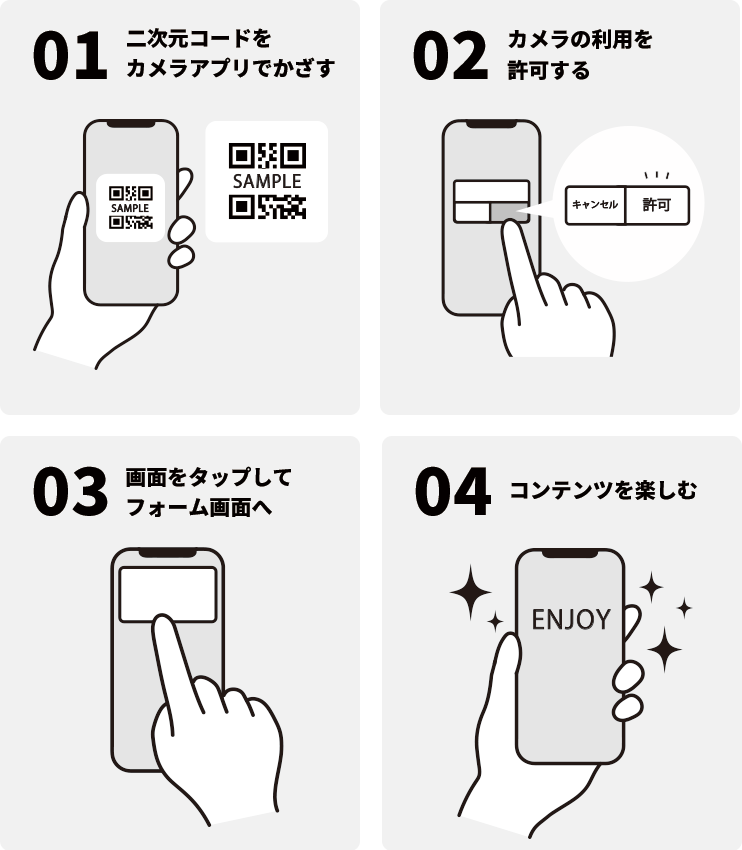
参加方法
- Step1
- ライブ会場に掲載されている二次元コードをカメラアプリでかざす
- Step2
- カメラの利用を許可する
- Step3
- 画面をタップしてフォーム画面へ
- Step4
- コンテンツをお楽しみください
利用可能時間
・お時間は多少前後する可能性がございますことご了承ください。
・「SNSアイコンメーカー」のブラウザを閉じてしまった場合
ブラウザの閲覧履歴から、会場内/期間内であれば何度でもアクセスができます。履歴を誤って削除してしまった場合は、お手数ですが再度二次元コードをスキャンしてください。
事前準備/必ずお読みください
参加にはカメラを搭載したスマートフォンが必要です。
設定に誤りがあると、コンテンツのご利用ができません。予めお使いの端末の設定をご確認いただきますようお願い申し上げます。
- ●Android 端末はGoogle Chrome、iOS 端末はSafari を使用して下さい。
- ●下記設定方法をご確認の上、カメラを許可してください。
- ●設定を許可してもコンテンツへのアクセスができない場合は、ブラウザの閲覧履歴やCookie の削除をお試しください。
- ■ カメラの設定はできていますか?
-
iOS 端末の設定方法はこちら
Android 端末の設定方法はこちら - ■ Android 端末はGoogle Chrome / iOS 端末はSafari を使用していますか?
※設定を許可してもコンテンツへのアクセスができない場合は、ブラウザの閲覧履歴やCookie 削除をお試しください。
ブラウザの閲覧履歴やCookie 削除および設定変更に伴い発生した不具合について、弊社は一切の責任を負いかねます。ご了承ください。
<閲覧履歴とCookie 削除方法>
・iOS 端末:
iPhone、iPad、iPod touch でSafari から閲覧履歴とCookie を消去する
・Android 端末:
Chrome でCookie の削除、有効化、管理を行う
キャッシュとCookie の消去
閲覧データを削除する
※本キャンペーン利用に関する通信費は、お客様ご自身のご負担になります。
<お問合せ先>
ユニバーサル ミュージック カスタマー・サービスセンター
月~金 10:00~18:00 (祝祭日を除く)
https://support.universal-music.co.jp/hc/ja
※土日・祝日に頂いたお問い合わせは、翌営業日の受付となります。ご了承ください。
※お問合せ内容によってはご返信までにお時間を頂く可能性がございます。ご了承ください。
Celebrate Ado’s homecoming concert “Ado DOME TOUR 2025 Yodaka” with our concert-exclusive Social Media Icon Maker!
How to Participate
STEP 1: Scan the QR code at the venue with your camera app.
STEP 2: Enable camera access.
STEP 3: Tap the screen to open the form.
STEP 4: Enjoy the exclusive content available only at the show!
Event Period
・Please note that event times may shift.
・If you close the “Social Media Profile Icon Maker” page
You can re-access it from your browser history anytime while you are at the venue during the event period.
If your history has been cleared, simply scan the QR code again to access it.
Please Read Carefully
・Participation requires a smartphone equipped with a camera.
・If your device settings are incorrect, you may be unable to access the content.
・Please ensure that your device settings are properly configured before participating.
・Android device users: Please use Google Chrome / iOS device users: Please use Safari.
・Before participating, please confirm the settings below and allow access to camera.
・If you are still unable to access the content after granting permissions, please try clearing your browser history and cookies.
Camera Settings
[How to check settings on iOS devices (Japanese)]
[How to check settings on Android devices (Japanese)]
Browser Settings
Please ensure that you are using Google Chrome (Android) or Safari (iOS).
If you continue to experience issues after allowing all permissions, try clearing your browser history and cookies.
Please note that the organizer shall not be held responsible for any issues arising from the deletion of browsing data or changes to browser settings.
How to Clear Browsing History and Cookies
iOS devices:
[Delete browsing history and cookies in Safari on iPhone, iPad, or iPod touch (Japanese)]
Android devices:
[Delete, enable, or manage cookies in Chrome]
[Clear cache and cookies]
[Delete browsing data]
*Please note that all communication costs associated with using this campaign will be the responsibility of the participant.
Universal Music Customer Service Center
Operating hours: Mon thru Friday 10:00 am ~ 6:00 pm JST (excluding holidays)
https://support.universal-music.co.jp/hc/ja
*Inquiries submitted on weekends or national holidays will be handled on the next business day.
*Please note that responses may take additional time depending on the content of your inquiry.